Find the Right IT Partner: Resource Center

Find the Right IT Services Provider, Quickly

Choosing the best managed IT services provider shouldn’t feel like guesswork. When technology breaks, productivity drops, communication slows, and opportunities slip away. We built this Right Fit IT Resources page to help you avoid those problems by guiding you toward a reliable, proactive IT partner. Whether you’re replacing an unreliable MSP, thinking about a technology product, preparing to scale, getting ready to reduce your size, or simply trying to make a smarter long-term decision, this page will help you understand what to look for and what to avoid.

When you choose an IT firm, you’re not just buying support, you’re choosing a partner that impacts productivity, security, and peace of mind. The wrong fit can cost you time and opportunity. The right fit can make technology seamless, reliable, and empowering. Let’s explore what that really looks like.

lEARN MORE:
MATCH IT

What to Look for in a Managed IT Services Provider (MSP)

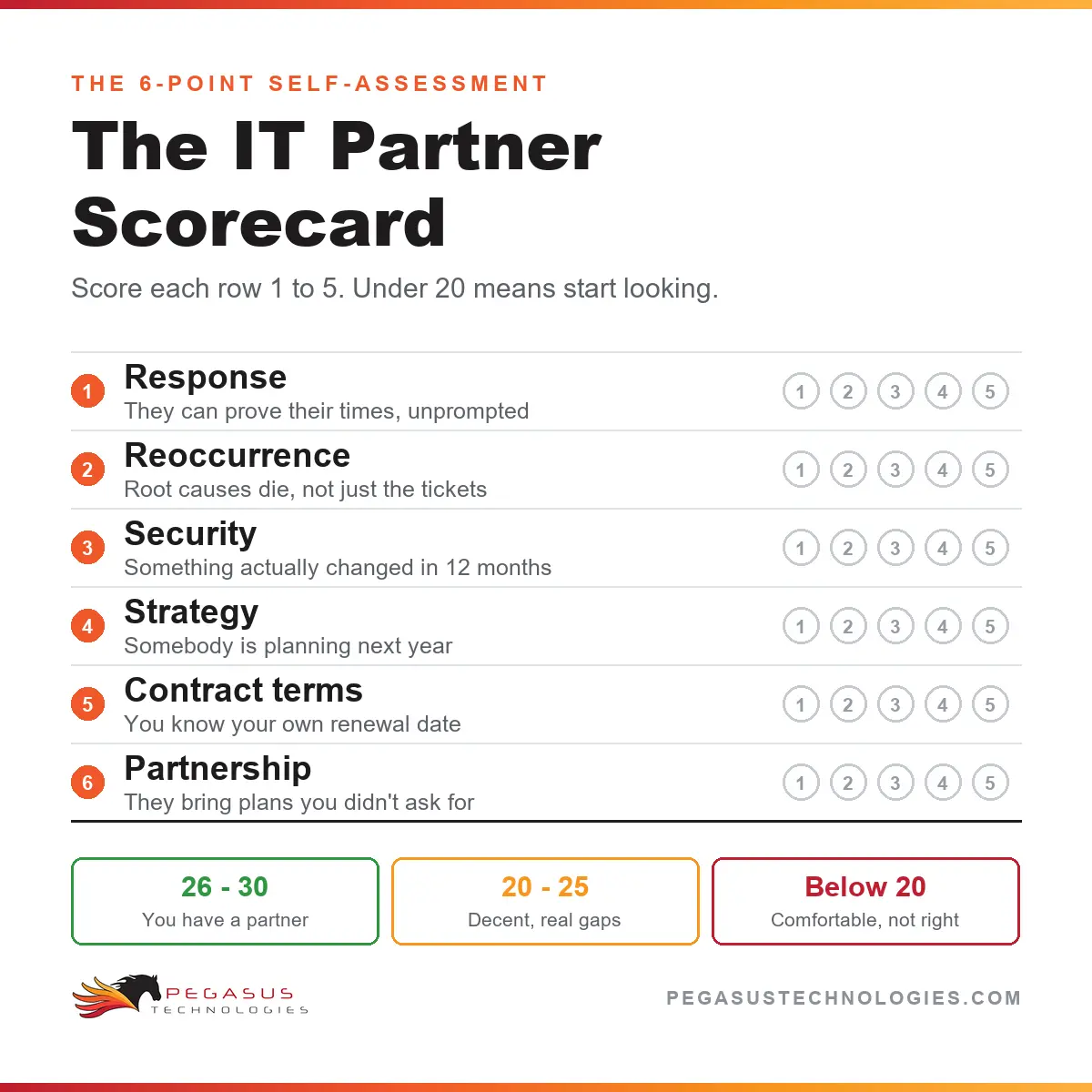
A strong IT partner helps your business stay productive, protected, and positioned for change. Your MSP should consistently respond promptly and triage issues to prioritize your projects, problems, and people without your micromanagement. They should track and report the time it takes them to both respond and resolve issues. They should look at trends and recurring issues for opportunities to improve. The best providers combine proactive service, transparency, and true collaboration. If you’re evaluating options, consider the following insights from our most popular guides:

Expertise Across Modern IT Environments

From cloud migrations to hybrid workplaces, Pegasus helps businesses manage technology across every platform. Whether you use Microsoft, Apple, Chromebooks, tablets, smartphones, or a mix of all five, our team ensures seamless integration, security, and scalability. We help clients determine how, when, and which cloud makes sense for them. It often surprises people to learn that there are many cloud options available and they aren’t created equally, so the cloud is not one-size-fits-all. If you’re moving offices, we will help you plan what your on-premise infrastructure really needs to be.

Compliance & Cybersecurity: Why It Matters

Cybersecurity and compliance are no longer optional. Cybercriminals now use sophisticated automation that has made everyone a target. Even if your business isn’t required to follow federal standards like NIST 800-171 or CMMC, choosing an IT provider who understands compliance ensures stronger security and credibility. Pegasus has deep expertise in safeguarding sensitive data, performing penetration tests, and managing risk across industries. We also appreciate that we need to keep ourselves secure in order to keep our clients safe.

Matthew Tucker- CEO

TITAN 100 hall of fame

Proven Results and Local Commitment

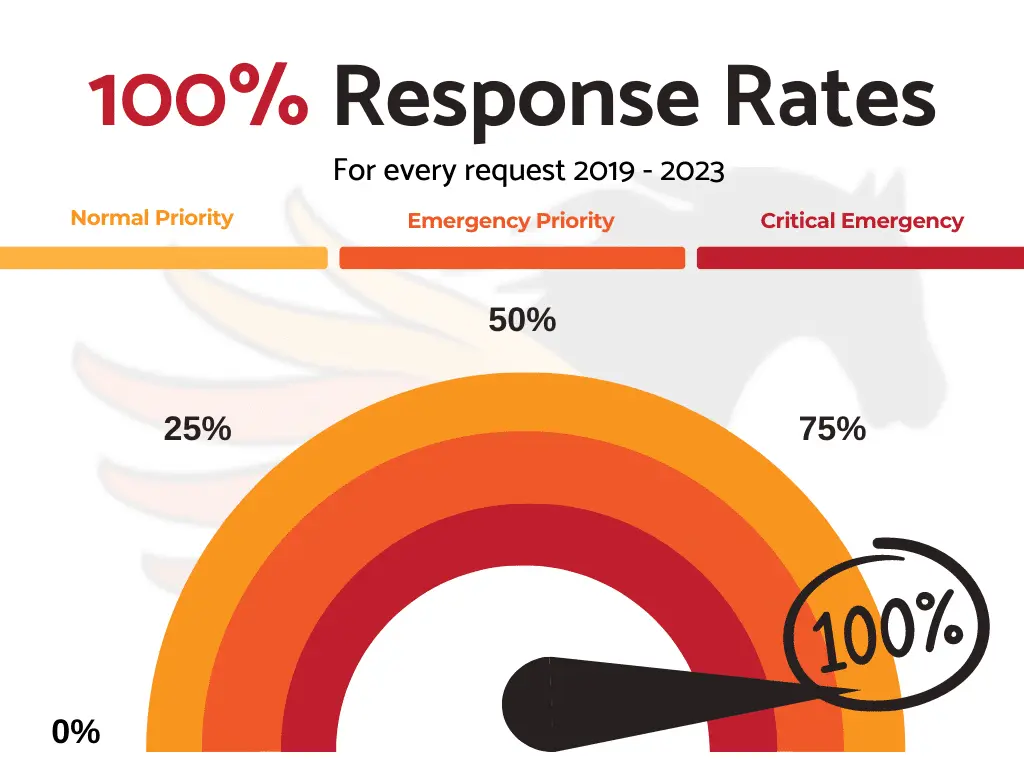
We’re a locally owned company made up of people who live in the community. With offices in Kennett Square, Media, Wayne, and Bethlehem, and across the Lehigh Valley, Pegasus Technologies is proud to serve organizations in Southeastern Pennsylvania and Northern Delaware businesses with local care and national-level expertise. We’re recognized by our peers, active in our chambers of commerce, supportive to area nonprofits, and honored through numerous awards that highlight our commitment to excellence. Our team is available 24/7, with fast response and resolution times that keep your business running smoothly. Pegasus resolves 99% of critical emergencies in 30 minutes or less, ensuring that problems are addressed quickly and operations stay on track.

CHAMBER MEMBERSHIPS

Pegasus Technologies is an award-winning support team involved with several local business chambers.

Frequently Asked Questions

In short, it depends. The best MSPs have many years of experience and were typically founded decades ago performing hourly computer break-fix labor, so they know what it takes to prevent problems from happening and what it will inevitably cost to fix issues that appear even on well-maintained networks. They also know what maintenance is worth it and what activities may sound nice but add no practical value. All of this experience results in a calculated price that's based on the number of devices and/or the number of people you have.

For some MSPs, it's as simple as counting mailboxes. Others want to know how many people are authorized to call into support. Some want to know how many computers they'll be expected to support. Some want to know all IT hardware assets, including routers, switches, and wireless access points. Others might only care about how many cloud providers you have and how many accounts or subscriptions you have with each one. At Pegasus, we want to know all of the above, because it results in the most accurate pricing for both sides of the partnership, and we want our clients to be our long-term partners.

While people count is an important component of an MSP's monthly price, it's not the whole picture. We often see MSPs using the headcount price model that "miss," or "forget," or "will get around to" protection and maintenance on all the devices on a network. What if a person has a second computer? It's important that second computer has the same protections as the person's first computer, even if it's only used part-time, so that it's not an easy target for cybercriminals. All devices on the network should be ready work when they need to work. We hate surprises, especially preventable ones. We like to see incentive for properly securing and maintaining everything in a client's environment and safely decommissioning devices that are no longer necessary. We don't want to see projects drag-on because a migration never reaches 100%. It's common that the per-mailbox providers cannot produce an inventory report of IT assets, because they don't truly know what hardware is on the network and what devices store company data. That's scary.

We believe device counts are critical components of MSP monthly pricing, but device count alone doesn't tell the whole story. It's important the active, licensed accounts are properly accounted for, too. Unused licenses could be costing extra money with your cloud providers and creating additional footholds for attackers to climb into your network. If your workforce is seasonal, you may not want to pay for full coverage on all your devices during your off-season months. It's critical your provider understand who in your business uses what technology when to provide you the most value.

In addition to the per-device and per-person models discussed above, it's important to know what services are excluded. Things like onsite support, computer replacement, data migration, installing new programs, setting up new employees, moving people, and revoking access of terminated employees are all areas worth understanding. Is there a service call or travel charge for onsite visits? Are onsite visits from senior techs that know your account even available? Is there a surcharge for emergencies? What are the support hours? Is support available outside business hours? Are projects included, and what is a project?

We're seeing more and more service agreements from our competitors that limit the number of calls per month, cap the number of issues per month, and set a maximum number of hours per month. Organizations can hit the hour limit faster than they expect due to rounding, minimum charges, and time spent working remotely.

We've heard first-hand horror stories of people who called their MSP to request admin rights or a password reset and the person on the other end of the phone gave it to them. No caller validation. No security approval process. No documentation of the call. Just dangerous access handed to the caller with a helpful smile, totally unaware of the security compromise that could have happened if the caller was a malicious actor. What if a junior employee called the helpdesk to say they can't access the accounting folder? What if the junior employee says they are the CEO? Thanks to company websites, LinkedIn, and other social media, it's not hard to sound knowledgeable and answer basic security questions, especially with the help of AI. Does the helpdesk follow a security protocol to prevent unauthorized callers from gaining access?

There are countless examples of "the IT helpdesk" calling someone and asking them to open a link on their computer. The stories end with ransomware or worse. How are your people trained to confirm it's the MSP calling? Caller ID can be spoofed- do your people know that? This should be standard procedure with training from your MSP.

How does the helpdesk know it's OK if someone calls asking for a password reset, a new account created, or access to a folder that happens to hold sensitive data? There should be strict controls in place to maintain security, record service requests, and document action taken.

Contracts frequently have evergreen or autorenewal clauses, automatic price increases annually or at renewals, required notice (sometimes as long as 90 days) of non-renewal to avoid automatic renewal, and termination fees for early cancellation. These aren't necessarily bad things to help deliver you the best value over the course of a lasting partnership, but know the rules before you sign and be prepared if you're thinking about looking for alternatives. The length of time required for termination and automatic renewal dates are a common surprise for many people, especially when someone inherits responsibility for an IT provider's contract that was signed by an executive who's no longer there or no longer in the same position.