
New Outlook Calendar and Daylight Saving Time: Avoid Costly Scheduling Mistakes
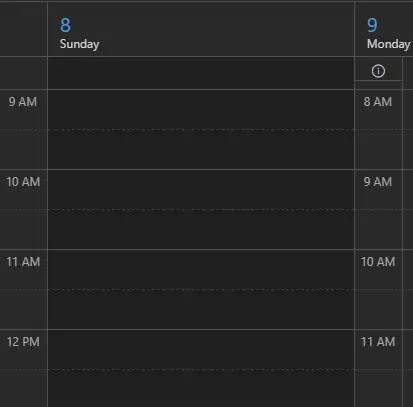
If you’re using the New Outlook calendar and scrolling ahead to the week of March 8, you may notice something unusual. Two time columns appear on the left side of your calendar view.
At first glance, this layout is easy to misread. Meetings may appear to be at the wrong time. You could show up early. You could show up late. Worse, you could double-book yourself.
What’s going on?
It’s all about Daylight Saving Time (DST).
With snow still on the ground in many regions, most people aren’t thinking about changing clocks. But DST begins March 8. The New Outlook calendar attempts to help by displaying both Standard Time and Daylight Time. Unfortunately, this feature can cause confusion instead of clarity.
Let’s break it down so you can avoid scheduling errors.
Why the New Outlook Calendar Shows Two Time Columns
The New Outlook calendar includes a feature that displays two time columns during the week of a time change.
Here’s what’s happening:
-
The far-left time column represents Standard Time.
-
The second column represents Daylight Saving Time.
-
The switch happens early Sunday morning when clocks move forward one hour.
Outlook is technically correct. It’s accounting for the time shift.
But visually, it’s confusing.
If you glance quickly at your calendar, you may read the wrong column. A 9:00 AM meeting might appear to be at 8:00 AM if you look at the wrong side.
This is especially risky if you:
-
Schedule meetings across time zones
-
Manage executive calendars
-
Work in IT, operations, or project management
-
Depend on tight scheduling windows
Even experienced Outlook users can get tripped up.
Understanding Daylight Saving Time in Outlook
Daylight Saving Time begins at 2:00 AM on Sunday, March 8. Clocks move forward one hour.
The New Outlook calendar visually reflects this transition by showing:
-
Standard Time before the shift
-
Daylight Time after the shift
Technically, the far-left column only applies to the very early hours of Sunday morning. After clocks change, the second column is the correct reference.
However, if you’re reviewing your calendar for the upcoming week, you may not immediately realize this. The layout makes it easy to misinterpret event times.
Microsoft’s intent was helpful. But in practice, it adds cognitive load.
Understanding the rule is simple. Reading the calendar view quickly? Not always.
How to Avoid Scheduling Errors in the New Outlook Calendar
If you want to prevent being late, early, or double-booked, use these simple tips.
1. Switch to “Work Week” View
The fastest fix is to change your calendar view to Work Week.
If you don’t work Sundays, this removes the early Sunday Standard Time column. The extra time column disappears, and the calendar looks normal again.
This is the simplest solution for busy professionals who don’t want to overthink it.
2. Double-Check Events on Mobile
Interestingly, this dual-column feature has not fully rolled out to mobile Outlook.
Open the meeting invite on your phone to confirm the time. It provides a cleaner, single-time display.
This quick cross-check can prevent mistakes.
3. Open the Calendar Item Directly
Instead of relying only on the visual time grid:
-
Click into the calendar event.
-
Confirm the scheduled time in the meeting details.
-
Verify the time zone if applicable.
This is especially important for remote teams and distributed organizations.
4. Review Recurring Meetings
Recurring meetings that span a DST change can create confusion.
Review:
-
Weekly stand-ups
-
Executive check-ins
-
Client calls
-
Automated reminders
If your organization operates across time zones, confirm that all participants see the same time.
Why the New Outlook Calendar Update Matters for IT Teams
At Pegasus Technologies, we work with organizations that depend on precision.
Cloud infrastructure teams.
DevOps engineers.
Security operations centers.
Data analytics groups.
For these teams, a one-hour mistake isn’t minor. It can:
-
Delay deployments
-
Disrupt incident response
-
Impact customer SLAs
-
Create compliance issues
The New Outlook calendar update highlights a broader truth: even small software interface changes can affect productivity.
Time synchronization plays a critical role in:
-
Cloud workloads
-
Log correlation for cybersecurity investigations
-
Automated DevOps pipelines
-
Data analytics reporting accuracy
If time stamps are inconsistent, troubleshooting becomes harder. Reporting becomes unreliable. Security investigations take longer.
That’s why proactive IT management matters.
Whether it’s maintaining accurate time zone settings in Microsoft 365, verifying server time synchronization, or preparing users for UI updates, attention to detail protects your organization.
The Bigger Lesson: Stay Ahead of Platform Changes
The shift from Traditional Outlook to the New Outlook is part of Microsoft’s modernization strategy. Cloud-first platforms evolve constantly.
But major UI changes require user awareness.
IT leaders should:
-
Notify staff before DST transitions
-
Provide short internal tech tips
-
Encourage calendar verification during transition weeks
-
Monitor help desk tickets for confusion spikes
Small guidance prevents larger headaches.
This situation also reinforces an important principle: SaaS platforms update frequently. Features designed to help users may temporarily disrupt workflows.
Organizations that stay informed adapt faster.
Organizations that ignore change react later.
Practical Steps for Business Leaders
If you manage teams, take a proactive approach.
Send a quick reminder the week before Daylight Saving Time. Explain:
-
Why two time columns appear
-
Which column applies after the time change
-
How to switch to Work Week view
Include a screenshot if possible. Clear communication reduces uncertainty.
You may also want to:
-
Review global team scheduling policies
-
Standardize time zone naming conventions
-
Encourage employees to verify time zones in meeting invites
For companies operating across multiple regions, this becomes even more critical.
Quick Recap: What to Remember About the New Outlook Calendar
Here’s the simple takeaway:
-
The New Outlook calendar shows two time columns during DST transition week.
-
The far-left column applies only before clocks change early Sunday.
-
The second column applies after Daylight Saving Time begins.
-
Switching to Work Week view removes confusion if you don’t work Sundays.
-
Double-checking meetings on mobile adds an extra layer of confidence.
A 30-second review today can prevent a missed meeting tomorrow.
A Small Change with Big Impact
It’s easy to dismiss this as a minor annoyance.
But in fast-moving organizations, small scheduling mistakes create ripple effects:
-
Missed client meetings
-
Delayed project approvals
-
Executive frustration
-
Operational slowdowns
Technology should simplify work. When new features introduce friction, leadership and IT teams must step in with clarity.
At Pegasus Technologies, we believe smart technology management is about more than infrastructure. It’s about user experience, productivity, and business continuity.
When platforms change, your strategy should adapt just as quickly.
Stay Ahead with Pegasus Technologies
Software updates are constant. User interfaces evolve. Security threats shift. Cloud environments grow more complex.
You don’t have to navigate these changes alone.
Pegasus Technologies helps organizations stay ahead with:
-
Cloud Infrastructure optimization
-
Cybersecurity protection and monitoring
-
DevOps automation
-
AI and data analytics solutions
If you’re evaluating Microsoft 365 governance, improving IT operations, or planning your next infrastructure upgrade, our experts can help you move forward with confidence.
Want to see a tech tip for a specific topic? Have a cool tip you would like to share?
Contact Pegasus and let us know. Your idea may appear in a future newsletter.
Or, if you’re ready to strengthen your IT strategy, schedule a consultation with Pegasus Technologies today and ensure your technology supports your success—every hour of the year.
Include a relevant image or infographic with optimized alt text that contains the primary keyword “New Outlook calendar.”